FaroWP
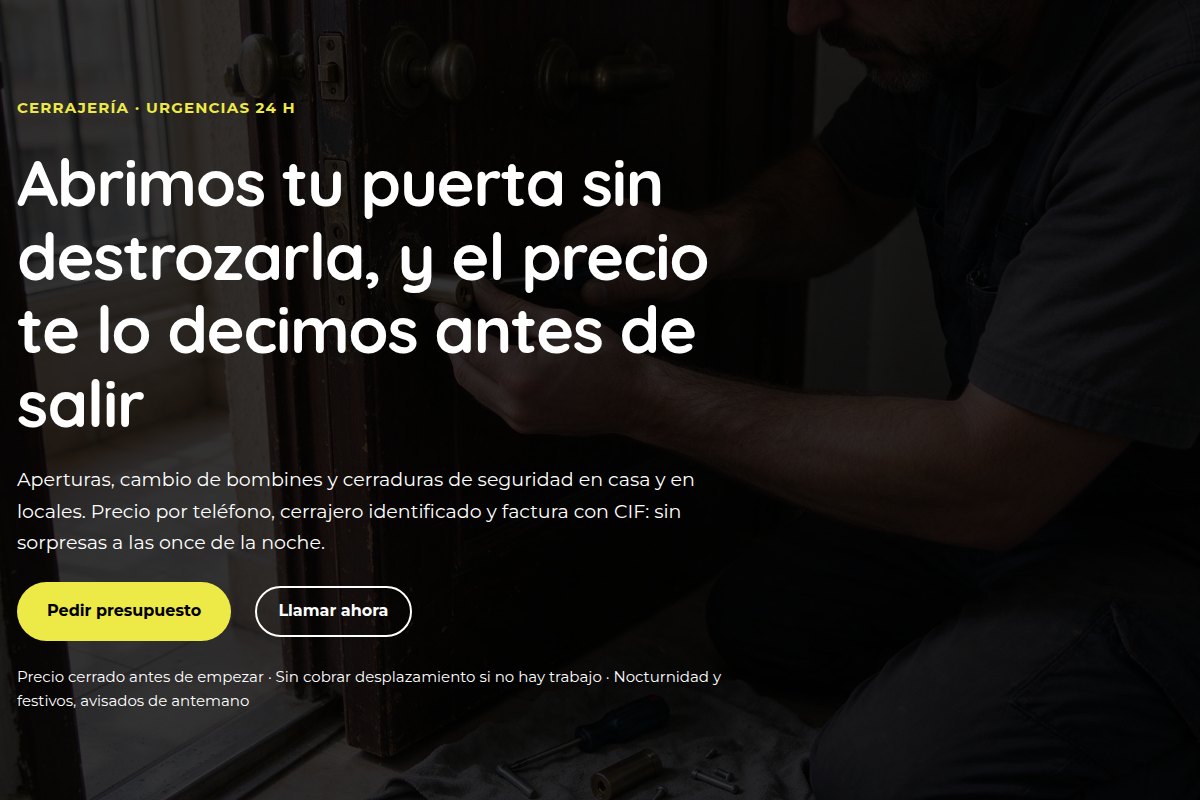
Gremio's demo home page with the Locksmithing style

Free theme · Locksmithing

We open your door without wrecking it, and we tell you the price before setting off

Gremio is the WordPress theme for locksmiths. It brings that first screen and the rest of the site built —the services, the price patterns and the contact— with the patterns that already come inside, in eight style variations, one per trade: this is the Locksmithing one.

Download Gremio free See the demo

The headline above is the one the theme brings for this trade: it is written that way so you can see what each variation is about, and it is changed in the editor like any other text.

0JavaScript files
0third-party requests
60patterns ready to use
8style variations

This is how it really looks

It is not a mock-up: this is a screenshot of the theme's demo with the Locksmithing style applied. The photos are the demo ones, made for the theme; the ones you use are your own.

your-locksmith.com
Gremio's demo home page with the Locksmithing style
The Locksmithing home page exactly as it comes out of the theme: the header photo, the trade headline and the buttons.
Gremio's demo home page with the Locksmithing style
The same home page, smaller. The same first-screen block, to see the layout and the colour of the Locksmithing variation up close.

What it comes with

Measured on the theme you download, not on a list of promises.

The Locksmithing variation

Ink#161a1f
Accent (action)#e8c547
Accent 2 (details)#2f6d8f

The theme stores the “Locksmithing” variation with these three colours and with buttons with a rounded corner (8 px). Changing variation is changing the whole website's colour and shape from the editor, without touching a line of code: the eight variations are the same theme.

How to get it running

  1. Download the .zip and upload it in Appearance → Themes → Add new → Upload theme.
  2. Activate it. The Locksmithing home page is already built with the theme's patterns.
  3. In Appearance → Editor → Styles, choose the “Locksmithing” variation: the palette and the button shape change all at once.
  4. Set the Locksmithing home page and change the words and the photos in the editor. The patterns you do not use are removed.

The patterns for this trade

The ones the theme ships with the Locksmithing content already written. They are the same ones you see in the demo.

The services

Specific to locksmithing

Quick questions

Is it really free?

Yes, GPL licence and no hidden paid version. Download it, upload it and use it on your site or on your clients' sites.

Do I need to know design?

No. The theme brings the home page, the services and the contact page built with its patterns. You change the words and the photos, choose your trade's variation and that is it: there is nothing to lay out from scratch.

What about the contact form?

The theme brings the contact page with the details and the frame of the form (its fields and its privacy notice). The form that actually sends is yours to add, with WordPress's Forms block or with your plugin: the theme's pattern does not send mail on its own.

Can I change trade later?

Yes. It is the same theme: in Appearance → Editor → Styles you change the variation and the whole website changes palette and button without touching the content. The eight trades are the same website with eight faces.

And the demo photos?

They are photos made for the demo and they travel with the theme. If you publish your site, swap them for your own: in the editor it is drag and drop.

Works with the Gremio Kit plugin: it builds the whole website in one click.

See the plugin →

Subscribe to our newsletter

We tell you what ships by email: new versions, security notices and offers. One email a month at most.

By signing up you agree to receive emails from FaroWP with news, new versions and offers. You can unsubscribe in one click at any time.

English