FaroWP

PAID ADD-ON FOR FWP SOBREMESA

Several locations, several menus and the tables under control.

FWP Sobremesa Pro turns one restaurant's site into a group's: each location with its own address and hours, each menu with its own page and QR code, and every booking pinned to a real table — no double bookings, no phone calls.

1key for all three modules: nothing is sold separately
∞locations and menus, each with its own page
QRone per menu, for the table and for the door
0third-party plugins to take bookings

What it does, in three modules

One licence switches it on and it changes nothing about the free plugins: FWP Carta and FWP Sobremesa keep working exactly as they are. What it adds is what you need once the business is no longer a single room.

1

Several locations

Each venue with its own record: address, phone, opening hours and map. The site shows the one the customer picks and everything else follows.

  • The menu and the bookings go with the chosen location.
  • Confirmation emails carry that location's details.
  • A location without its own menu inherits the main one.
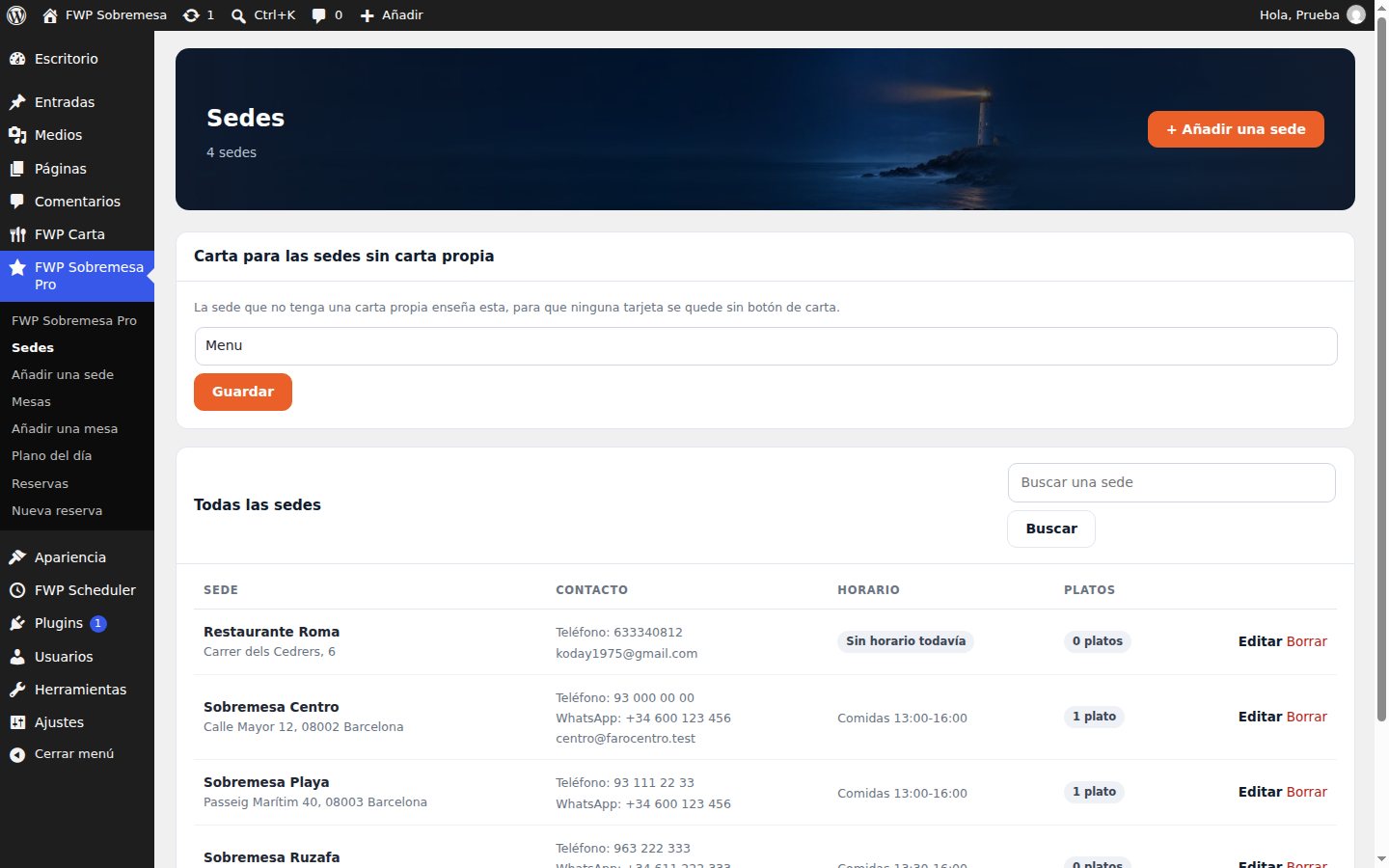
The Locations screen: four venues with their address, phone and opening hours
2

Tables and bookings

Tables are created with their seats and their area. The booking form only offers the times when a table is actually free.

  • No double bookings: the table is taken on confirmation.
  • Pending, confirmed and cancelled.
  • An email to the restaurant for every booking.
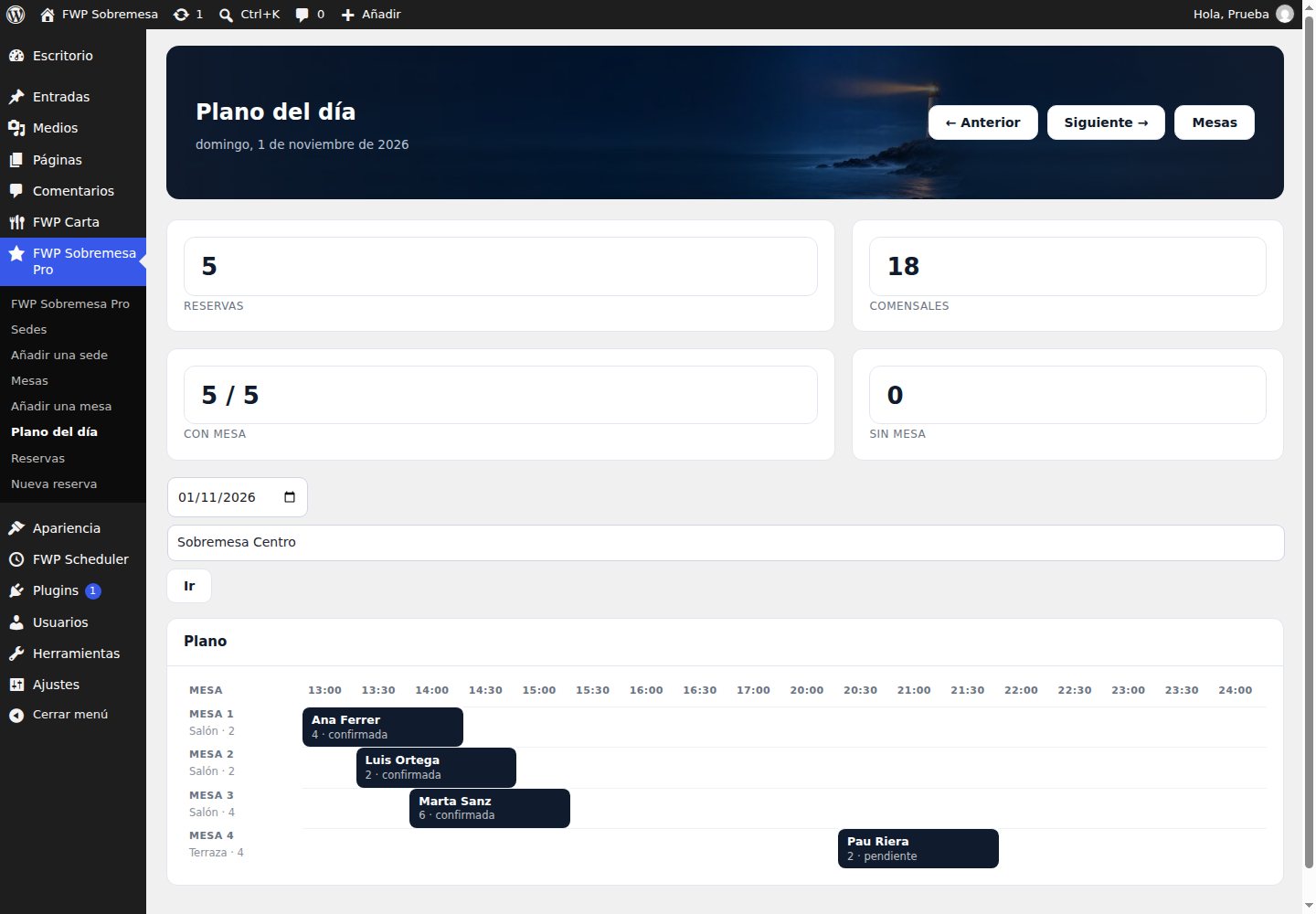
The day plan: tables as rows, half hours as columns, bookings in place
3

Several menus

Lunch, dinner and events as separate menus, each with its own page and QR code, without copying dishes or rebuilding the site every season.

  • Change a dish once and it changes in every menu it appears in.
  • A different QR per menu, for the table or the door.
  • Allergens and diets, with FWP Carta's printable sheet.
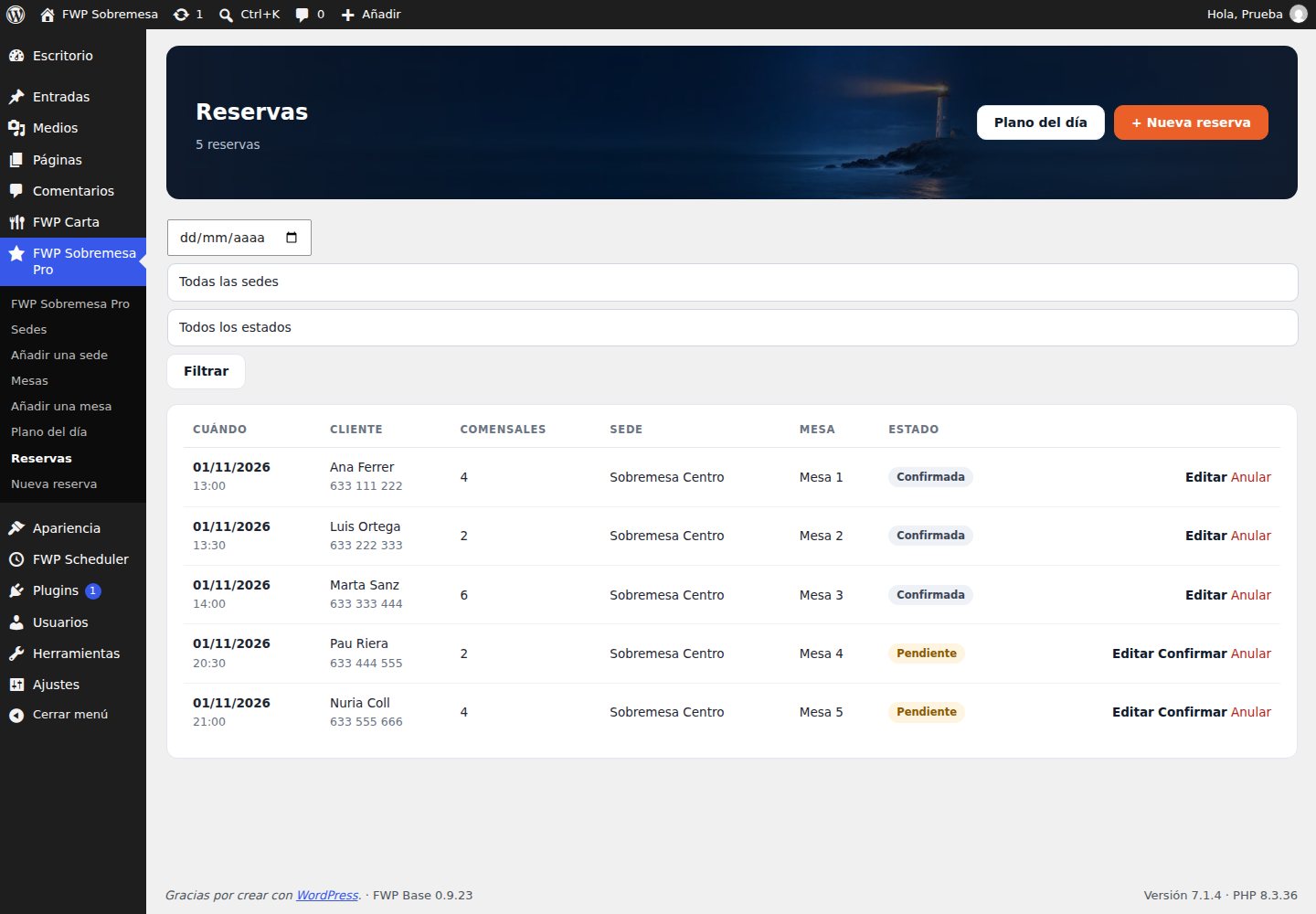
The bookings list with guest, party size, location, table and status

What it looks like inside

Screenshots from the plugin installed on a real WordPress, with four locations and nine tables. No mock-ups.

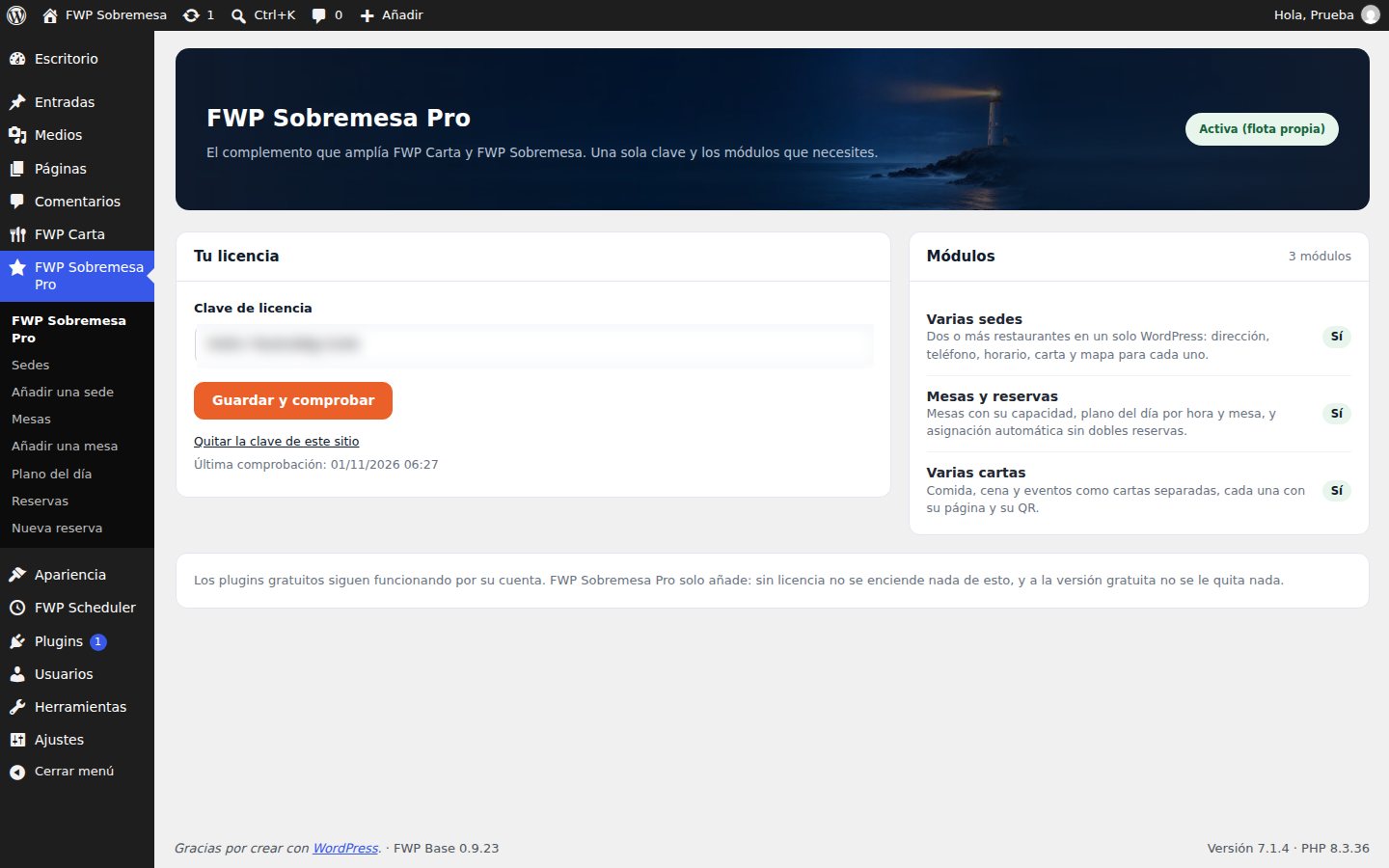
The FWP Sobremesa Pro panel: the licence key and the three modules switched on
The licence and the modules. One key switches the three modules on. Under it, what each one does.
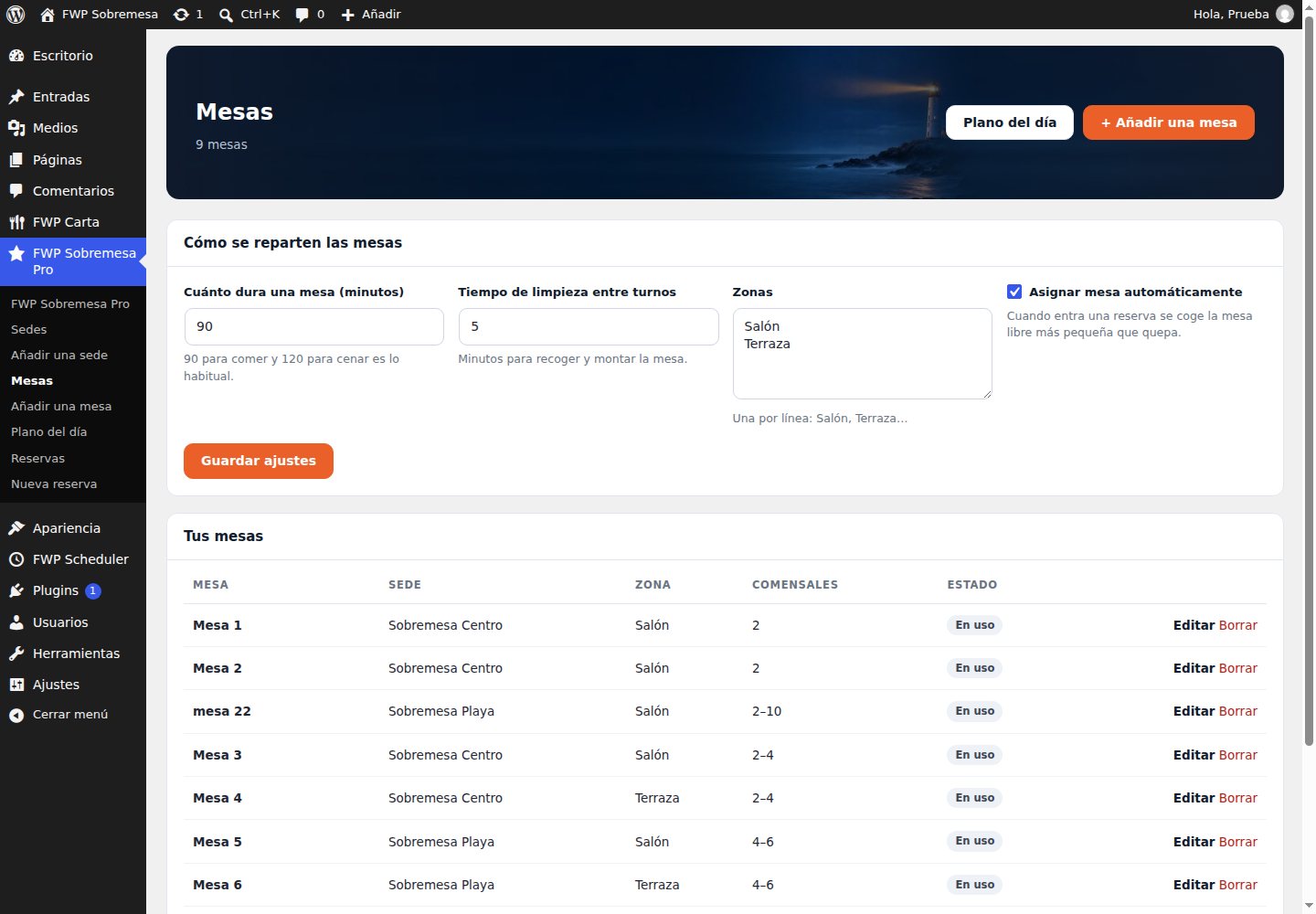
The Tables screen: nine tables with their area and seats
The tables. Seats, area and how long a table lasts: 90 minutes for lunch, 120 for dinner.
The bookings list with time, guest, party size, location and table
The bookings. Who is coming, when, how many and to which table. Confirm or cancel from here.
The day plan with bookings spread across tables and hours
The day plan. The whole afternoon at a glance: one table per row, half an hour per column.

Day to day

You add the locationsName, address, phone and hours. Done once.
You place the tablesWith their area and seats. The plan draws itself.
The guest books on the siteThey pick location, day and time; they only see slots with a free table.
You get the noticeAn email with the name, phone, party size and table.
You open the day planAnd see the whole afternoon. If someone moves time, you move the table with one click.

The licence, without surprises

Paste the key in FWP Sobremesa Pro and press Save and check. The licence is validated against farowp.com and switches on the modules it covers.

If it lapses nothing breaks: the paid modules switch off and the site carries on with the free plugins. Your data is not deleted.

What it does not do (yet)

  • It does not take a deposit or a card to hold a booking.
  • It does not sync with TheFork or Google Reservations.
  • It does not print a branded menu or work out food cost.

When any of that lands, it will be announced here and to licence holders.

Requirements

WordPress and PHP

WordPress 6.5 or newer and PHP 8.1 or newer.

The free plugins

FWP Carta and FWP Sobremesa, for the menus and the restaurant site. Both are free to download.

Outgoing email

For the booking confirmations to the restaurant and the guest.

Price

One licence switches on the three modules. Nothing is sold in parts and there are no modules to pay for separately.

PAID ADD-ON

FWP Sobremesa Pro

€79 a year

or €8 a month · VAT included · 1 site

  • Several locations, with their address, phone and hours.
  • Tables, bookings with real availability and the day plan.
  • Several menus, each with its own page and QR code.
  • Updates included while the licence is active.
  • The free plugins keep working even if you don't renew.

Club FaroWP

If you are going to use more than one product, the club works out cheaper: every paid plugin, this one included, and up to 5 sites with the same key.

You join from the client area.


And if it isn't for you?

14 days to ask for a refund, no questions. The licence is switched off and the free plugins stay exactly as they were.

Questions we always get

Do I have to pay for the free plugins too?

No. FWP Carta and FWP Sobremesa are free and stay free. This add-on only brings the group features: locations, tables and several menus.

What happens if I stop paying?

The paid modules switch off and the site keeps standing on the free plugins. Your locations, tables and bookings stay stored: renew and they are back.

Can I use the same key on two restaurants?

One licence is one site. For several venues of the same business, use locations; for separate businesses you need one licence per site, or the Club.

Do guests get a confirmation?

Yes: on confirmation they get an email with the location, the time and the table. The restaurant gets the notice with the phone number in case someone has to be called.

Start with the free ones

FWP Sobremesa and FWP Carta download for nothing. With them you already have the site and the menu. When the business asks for locations, tables or several menus, this is the licence.

See the FWP Sobremesa theme See all plugins

FaroWP news

New versions, security notices and offers. Rare and useful: one email a month at most.

By signing up you agree to receive emails from FaroWP with news, new versions and offers. You can unsubscribe in one click at any time.

English